> For the complete documentation index, see [llms.txt](https://documentation.astera.com/llms.txt). Markdown versions of documentation pages are available by appending `.md` to page URLs; this page is available as [Markdown](https://documentation.astera.com/astera-data-stack-v8/project-management/job-scheduling/job-monitor.md).
# Job Monitor
The Job Monitor will show information regarding all the jobs to the user. Whether the jobs are in the state of,
* Active
* Running
* Queued
* Successful
* Ending In Errors
* Terminated By Users
The Job Monitor is responsible for storing information on all the jobs associated with the Astera Data Stack server.
## **Methods Of Access**
There are a few ways to access the Job Monitor on your version of Astera.
### **Through Server Explorer**
The Job Monitor can be accessed through the Server Explorer. Simply,
* Go to the *Server Explorer* panel, right-click the *Default* node, and select *Job Monitor* from the context menu.

### **Through Astera Toolbar**
The Job Monitor can be accessed through the main menu. Simply,
* Click on the *Server* column on the main menu, and select *Job Monitor* from the drop-down options.

### **Job Monitor Toolbar Options**
There are options present on the toolbar of the Job Monitor itself.

* *Show Latest Jobs First/Show Oldest Jobs First*: This option will sort all the jobs on the monitor according to the most recent and oldest.
* The left-facing arrow sorts the latest jobs towards the top, and the right-facing arrow sorts the oldest jobs towards the top.

* *Pause Auto-Refresh of Job Monitor*: By default, this feature is selected. It will keep the Job Monitor list from automatically refreshing every time a new job is executed while the Job Monitor is open.
* Unselecting this option will update the Job Monitor list during run-time as jobs are running, scheduled, executed, or failed. It will reset all the filters as well.

* *Show Job Trace for Selected Item*: Selecting this option opens the job progress window. Inside it, we can see the jobs’ steps to end in success/error.
* The job trace shows us the details of the job.

* *Clear Job Queue*: Clear all the jobs that have been put up in a queue to run.

* *Delete Selected Jobs*: All the highlighted jobs are going to be deleted.

* *Delete All Completed Jobs*: All jobs that have already completed their execution will be deleted.
* Jobs that are currently running will not be deleted.

* *Show Root Level Jobs Only*: Selecting this will only display information on root-level jobs. A root-level job is one that does not have a parent assigned.

## **Job Monitor Filters**
*Servers*: To select which server the Job Monitor will display information from.

*Status*: To filter out jobs based on their status, i.e., Active, Successful, Ending in Errors, etc.

*Date Range*: Filtering jobs based on period, i.e., *Today, Yesterday, last month*, etc.
{% hint style="info" %}
**Note:** There is also a *Custom Range* option where the user can provide any custom *Date Range* of their choosing. It will then view only the jobs that fall in that range.
{% endhint %}

### **Advanced Search Options**
This option allows the user to extract information from the Job Monitor based on a specific search. It gives the user the ability to retrieve information on a particular search from many options.

14-Advanced-Search
Clicking on this will open a separate panel with additional options,

*Recent Search*: To navigate to a previous search that was already made.

*Server*: Select the server from which to pull up job information.

### **Additional Options**
* Enter the *Job Name/File Name* to search for it.

* Select from a list of options under which to search the job, i.e., *Active, Error, Success*, etc., based on the status of the job.

* Other options include a *Job Type* filter, *Date Range* filter, and checkboxes for *My Jobs Only* and *Root Level Jobs Only*

Once done, select *Search*, and it will return the desired results.

The results are then returned.
## **Job Monitor Context Menu**
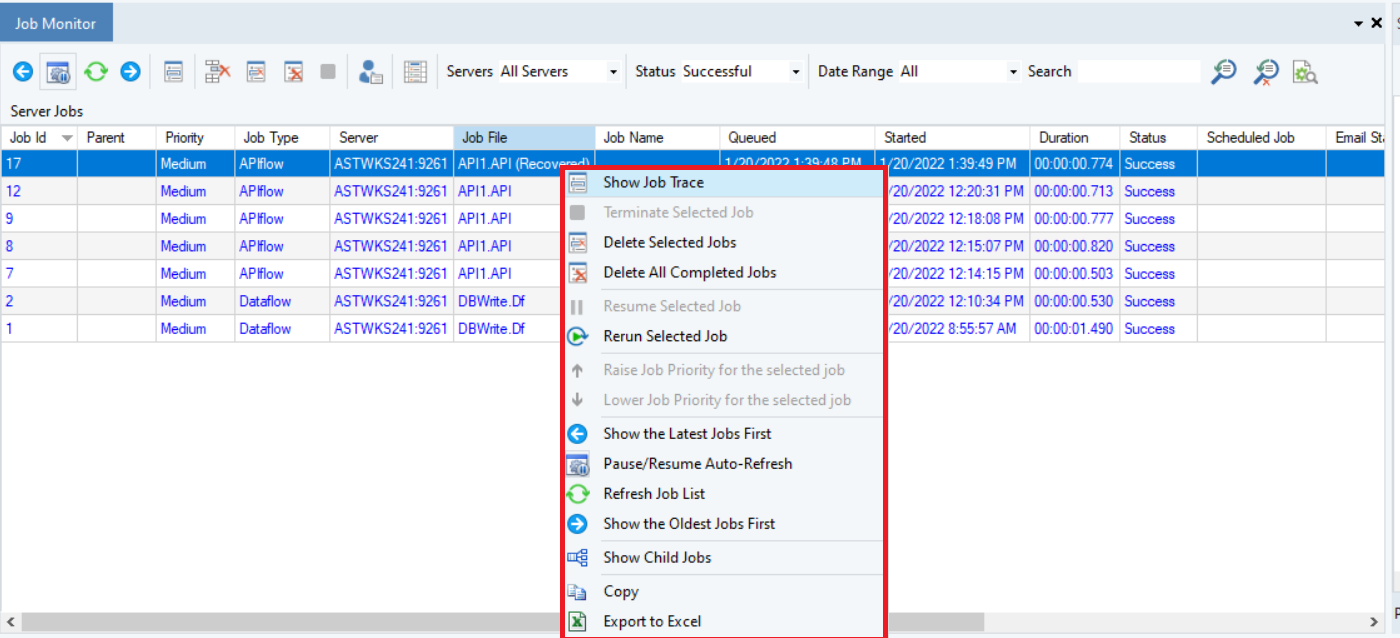
The Job Monitor context menu can be accessed by right-clicking anywhere on any job. The context menu can be opened after selecting multiple jobs too.
* *Rerun Selected Job*: This option is to rerun any selected job.
{% hint style="info" %}
**Note:** This option is not available when multiple jobs are selected.
{% endhint %}
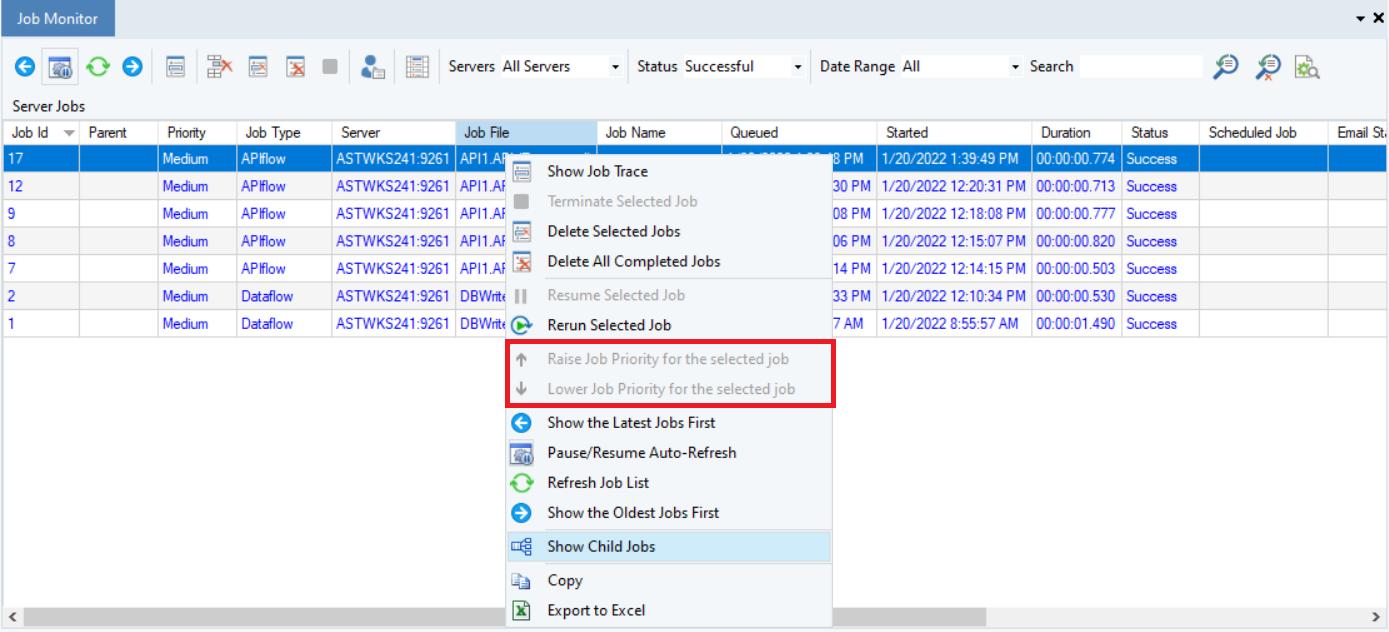
*Raise/Lower Job Priority for the Selected Job*: To increase or decrease the priority for any selected job. This will place the job higher or lower on the monitor.
It is only available when the job is in a running state.
*Show Child Jobs*: Selecting this option will show all child jobs associated with a particular parent job.
*Export To Excel*: To export all the jobs in the Job Monitor to an Excel sheet at a location of your choosing.
## **Job Monitor Columns**
These columns, given in the Job Monitor section itself, contain an extensive set of information regarding each job.
* *Job Id*: Every Job has a unique Job Id to identify it.
* *Parent*: To signify the parent node of a particular job.
* *Priority*: The level of priority for a given job.
* *Job Type*: To differentiate between types, i.e., Dataflow, Workflow, etc.
* *Server*: Signifies the server on which the job was run.
* *Job File*: The name of the job file.
* *Job Name*: A name that was assigned to the job.
* *Queued*: Timestamp for when a particular job was queued.
* *Started*: Timestamp for when a particular job started
* *Duration*: This signifies how long the job lasted.
* *Status*: The job status, i.e., success, terminated, etc.
* *Scheduled Job*: Displays the scheduled job ID of the scheduled job that ran.
* *Email Status*: Displays the status of the email sent on job conditions if any.
* *Records Read*: The number of records read per job.
* *Error Records*: The number of errors read per job.
* *Warning Records*: The number of warnings read per job.
* *User*: To signify which user performed a particular job.
This concludes our discussion on the Job Monitor in Astera.
---
# Agent Instructions
This documentation is published with GitBook. GitBook is the documentation platform designed so that both humans and AI agents can read, navigate, and reason over technical content effectively. Learn more at gitbook.com.
## Querying This Documentation
If you need additional information that is not directly available in this page, you can query the documentation by asking a question.
Perform an HTTP GET request on the following URL with the `ask` and `goal` query parameters:
```
GET https://documentation.astera.com/astera-data-stack-v8/project-management/job-scheduling/job-monitor.md?ask=&goal=
```
`ask` is the immediate question: it should be specific, self-contained, and written in natural language.
`goal` is what the user is ultimately trying to achieve, the reason they need the answer. Sharing it helps GitBook give you a better, more relevant answer. A goal is most helpful when it describes the outcome the user wants rather than restating the question. For example, with `ask=how do I create an API token`, a goal like `automate deployments from our CI pipeline` lets GitBook tailor the answer to that use case.
The response will contain a direct answer to the question and relevant excerpts and sources from the documentation.
Use this mechanism when the answer is not explicitly present in the current page, you need clarification or additional context, or you want to retrieve related documentation sections.