> For the complete documentation index, see [llms.txt](https://documentation.astera.com/llms.txt). Markdown versions of documentation pages are available by appending `.md` to page URLs; this page is available as [Markdown](https://documentation.astera.com/faqs/scheduler/how-can-i-schedule-a-job-to-run-every-x-hours.md).
# How can I schedule a job to run every x hours?
Currently, we don’t have the option to configure the scheduling frequency for n-hour intervals. We plan to introduce this feature in our future releases. However, there are potential workarounds to implement this in the existing versions.
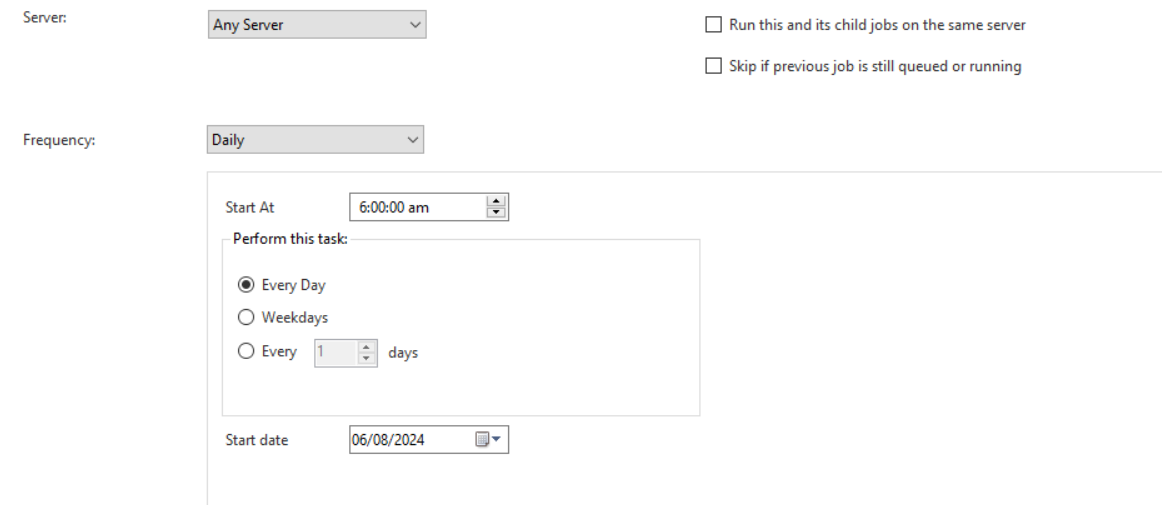
A simple way is to create 24/n distinct schedules, configured at either a Daily frequency or Once frequency, depending on the requirement. For example, if you want a job to run every 6 hours daily, you will create 4 schedules to run on a Daily frequency. The Start At time will be set at 00:00, 06:00, 12:00, 18:00 respectively for the 4 schedules.
---
# Agent Instructions
This documentation is published with GitBook. GitBook is the documentation platform designed so that both humans and AI agents can read, navigate, and reason over technical content effectively. Learn more at gitbook.com.
## Querying This Documentation
If you need additional information that is not directly available in this page, you can query the documentation dynamically by asking a question.
Perform an HTTP GET request on the current page URL with the `ask` query parameter, and the optional `goal` query parameter:
```
GET https://documentation.astera.com/faqs/scheduler/how-can-i-schedule-a-job-to-run-every-x-hours.md?ask=&goal=
```
`ask` is the immediate question: it should be specific, self-contained, and written in natural language.
`goal` is optional and describes the broader end goal you are ultimately trying to accomplish on behalf of the user. GitBook uses it to tailor the answer towards what is most useful for that goal.
The response will contain a direct answer to the question and relevant excerpts and sources from the documentation.
Use this mechanism when the answer is not explicitly present in the current page, you need clarification or additional context, or you want to retrieve related documentation sections.